Your thoughts change form.
Oviqen keeps them in sync — always.
Notes, Tasks, and Visual Diagrams aren't three apps stitched together. In Oviqen, they're three live dimensions of the same content — transforming seamlessly as your thinking evolves.
You don't lack discipline.
You're trapped between enterprise bloat and scattered apps.
Monolithic suites like ClickUp or Miro keep stuffing corporate features and complex menus you never asked for, while single-purpose tools force you to juggle five open windows. Oviqen brings serious multi-dimensional power — with the effortless simplicity your personal flow deserves.
Enterprise Bloat & Scattered Chaos
- Overwhelming feature bloat: Modern enterprise suites pack hundreds of complicated options meant for corporate managers, turning simple note-taking or task planning into a confusing chore.
- Trapped ideas & broken sync: You sketch an idea on a whiteboard or canvas, but it stays isolated from your actionable daily checklists and deadlines.
- Tedious duplicate work: You write a detailed note, then manually re-type parts of it into a task tracker, losing hierarchy and context.
- Forgetting the individual user: Tools pivot to enterprise contracts, sacrificing clean personal workflow, desktop speed, and offline reliability.
Oviqen: High Power, Zero Bloat
- Radically Simple, Deeply Capable: Clean, intuitive design where every feature has a purpose — easy enough to start in seconds, powerful enough to organize entire ventures.
- Live Dimensional Transformation: Click any diagram node to instantly unfold a rich document note, or an actionable task with schedules, priorities, and subtasks.
- Built for One Person, Deep Enough for Real Projects: Made for individual creators, engineers, and students who want focus — with the depth that a serious project needs.
- Instant Local Speed: Everything lives on your own computer, so it opens and saves instantly — and keeps working offline.
One project. Three native dimensions.
Most tools force you to duplicate content when your workflow shifts from ideation to planning to spatial mapping. In Oviqen, the same underlying items fluidly reflow into whichever view you need.
 Workspace
/
Website & Brand Launch
Workspace
/
Website & Brand Launch
Website & Brand Launch
Active ProjectComplete launch plan covering homepage design, core feature content, and public release preparation.
Design Homepage & Branding
Completed · 45 minFinalize visual identity, clean layout, color palette, and mobile responsiveness.
Write Content & Key Pages
In Progress · 30 minCraft clear value propositions, feature highlights, and interactive preview.
Review & Publish to Beta
Due Friday · 15 minVerify lightning-fast loading speeds, test feedback forms, and deploy live.
A complete personal operating system
Every feature is engineered to eliminate context switching, protect your deep focus, and provide profound visibility over your commitments.
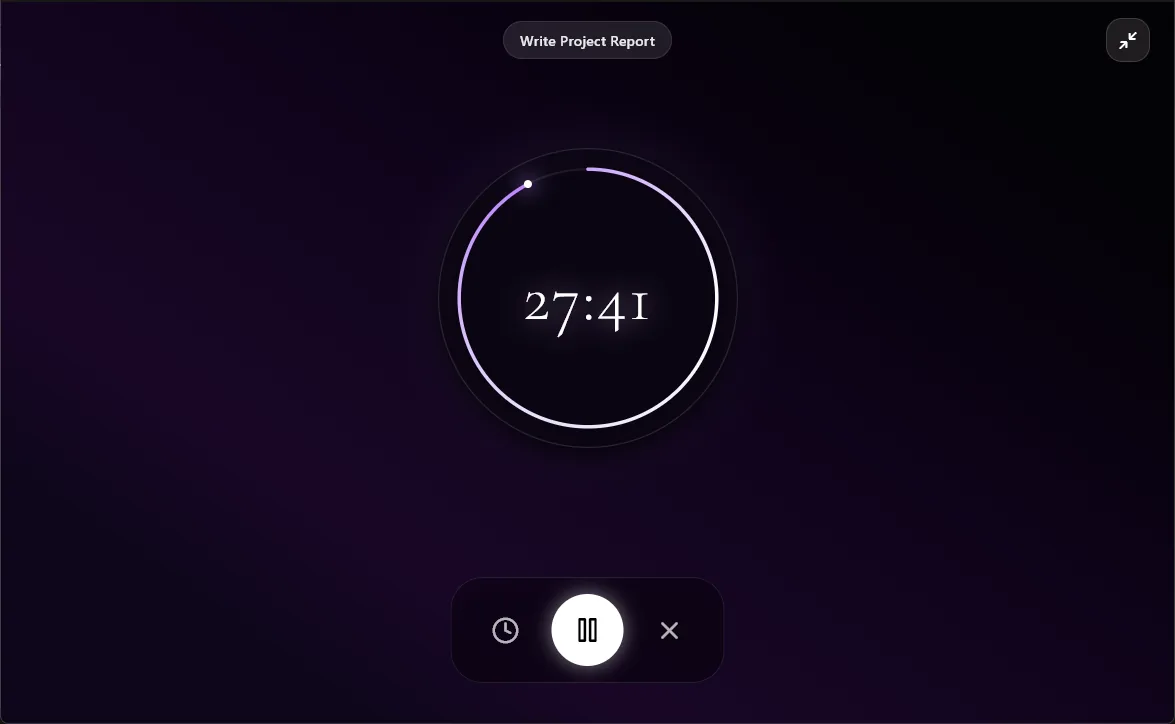
Immersive Focus Timer
When it's time to execute, eliminate peripheral noise with a dedicated full-screen countdown timer with soothing ambient visual feedback and motivational milestones.
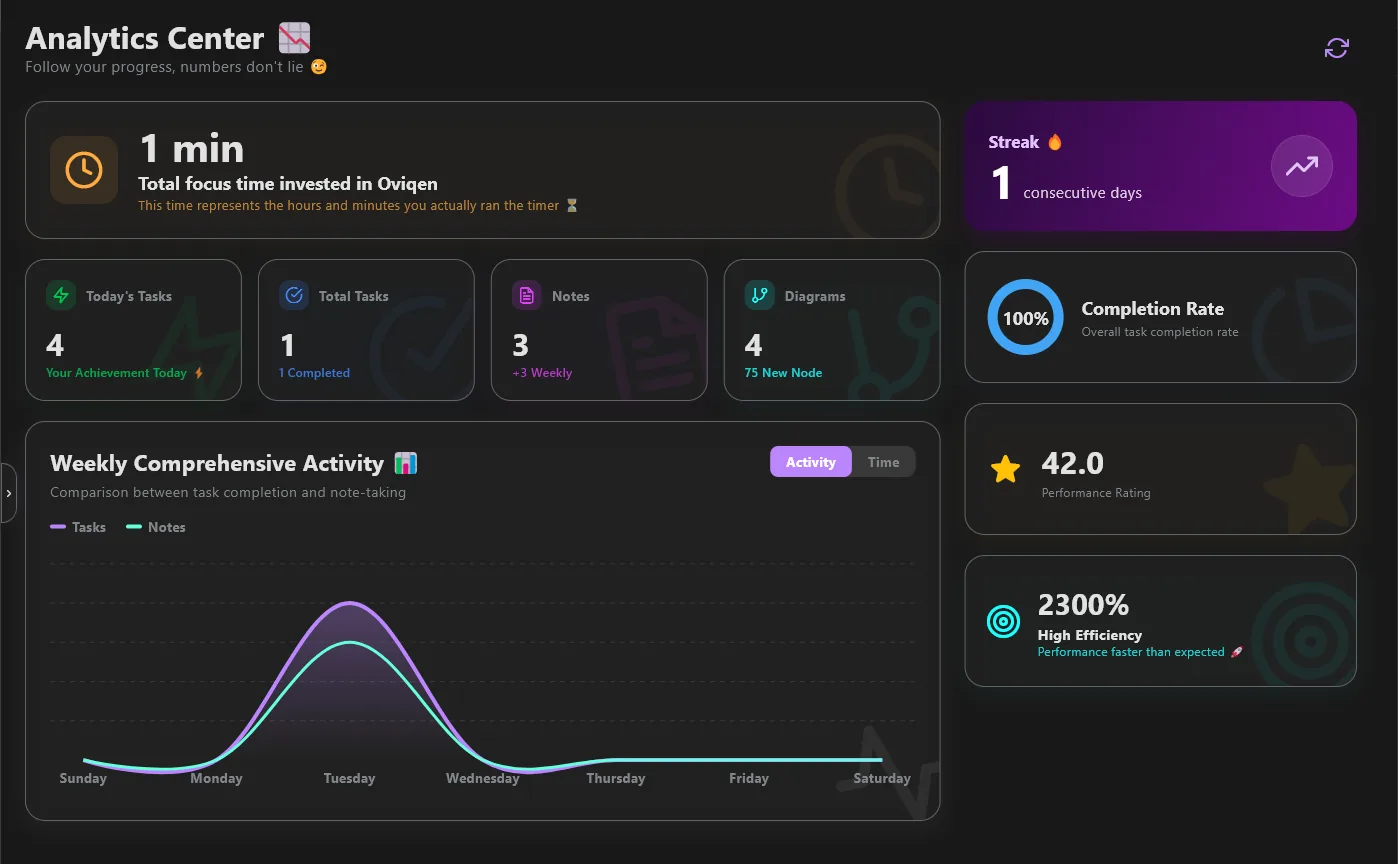
Analytics Center & Streaks
Follow your real progress. A dual-series activity chart compares your active task completions against note generation, calculating your streak, completion rate, and speed efficiency.
An Assistant That Does the Work
Ask in plain words and it acts in your workspace — task trees, filled diagrams, structured notes. It runs on your own API key (Gemini, OpenAI, Anthropic or OpenRouter) and asks before deleting anything.
Modular Block Notes
Compose documents using flexible modular blocks: formatted text, nested checklists, data tables, syntax-highlighted code, LaTeX math equations, images, callouts, and web embeds.
Hierarchical Task Engine
Multi-tiered subtasks, flexible recurring patterns (daily, weekly, custom cycles), intelligent due reminders, task dependencies, priority tags, and post-completion star ratings.
Instant Universal Search
Find any note, task, or connected idea across your entire workspace in milliseconds. Filter by priority, tag, status, or deadline with instant zero-lag response.
19 Languages Supported
Native localization across 19 global languages with full RTL & LTR bidirectional layout support, designed for effortless global productivity.
Full Import & Export
Zero vendor lock-in. Seamlessly export your notes, tasks, and diagrams into open Markdown and JSON formats anytime, or bring existing files in with zero friction.
What we're building next
Here is what Oviqen does today, and what we plan to build next. Plans can change as we learn from you.
Windows Desktop Edition
Full local-first workspace on Windows 10 & 11 with seamless note-task-diagram transformation, focus timer, analytics, and rich block editor.
AI Assistant on Your Own Key
Connect a key from Gemini, OpenAI, Anthropic or OpenRouter and the assistant works inside your workspace: building task trees, filling diagrams, and writing notes. Your key stays on your computer.
Cloud Sync, Your Choice
Optional sync of your workspace across your devices. It will be off unless you turn it on, and your local workspace keeps working either way.
Mobile App
A companion app for your phone to capture notes, check off tasks and look at your diagrams on the go.
Our Clear Data & Privacy Boundary
Your notes, tasks, and diagrams are stored on your own computer, not on our servers. Our server keeps only what your account needs — your e-mail, your profile and your plan. When you use the AI assistant with your own key, what you send goes straight from your computer to the provider you chose. Read the full Privacy Policy.
Frequently Asked Questions
Everything you need to know about Oviqen — from getting started to data privacy.
What is Oviqen and who is it for?
Oviqen is a unified personal productivity app for Windows that merges Notes, Tasks, and Visual Diagrams into one connected workspace. It's designed for students, professionals, developers, and anyone who wants to stop juggling multiple separate tools and instead work within a single system where content transforms seamlessly between dimensions.
Is my data safe and private?
Your notes, tasks, and diagrams are stored on your own computer, not on our servers. Our server keeps only what your account needs: your e-mail, the profile details you enter, and your plan. The AI assistant runs on your own API key, and what you send it goes straight from your computer to the provider you chose. Cloud sync is planned for later and will be something you choose to turn on. Details are in our Privacy Policy.
How is Oviqen different from Notion, Obsidian, ClickUp, or Miro?
Those tools are excellent at what they focus on: Notion at documents and databases, Obsidian at linked notes, ClickUp at team project management, Miro at whiteboards. You often end up using several of them and copying between them.
Oviqen is built around one idea: a note, a task and a diagram can be the same content. Change one and the others follow — with no plugins and no setup. It's made for one person's work first, with the depth a real project needs.
Does Oviqen require an internet connection?
You need the internet once, to sign in with a free account (Google or e-mail). After that your notes, tasks, diagrams and focus timer work offline and save instantly on your computer. The AI assistant needs the internet to reach your provider.
What platforms and languages does Oviqen support?
Oviqen runs on Windows 10 and Windows 11 (64-bit). A mobile version is planned. The app speaks 19 languages with full right-to-left support, including Arabic, English, Spanish, French, German, Chinese, Japanese, and more.
Can I export and import my data?
Yes. Export a note or a task as Markdown, or your whole workspace as a JSON backup, at any time — and import them back in. Your content stays yours.
Start thinking in all three dimensions.
Download Oviqen for Windows and stop retyping your ideas between tasks, diagrams, and notes. It's a beta: some things may still change, and what you tell us shapes what comes next.
By downloading you agree to the Terms of Service. See how we handle data in the Privacy Policy.
Windows Installation Advisory
Oviqen is made by a small independent team and isn't digitally signed yet, so Windows SmartScreen or your browser may warn you on the first download. To continue: click ..., choose Keep, then Keep anyway — or More info → Run anyway when the installer opens — as shown in the video below. Updates after that install from inside the app.